How to Work with Hermes
Hermes can research, transform information, create useful artifacts, and help plan actions through specialized, repeatable workflows. This public guide highlights selected capabilities we have refined while keeping private data, personal integrations, internal administration, and live systems out of view.
Research and understanding
Research with sources
Collect evidence, compare claims, and preserve links and uncertainty.Compare three primary sources about a public topic and list unresolved disagreements.
Summarize public web content
Turn a long article or public page into a concise brief.Summarize this public article for a five-minute review. Keep the source link.
Explain technical material
Translate jargon into plain language without erasing important caveats.Explain this public specification to a nontechnical reader.
Documents and structured work
OCR and document conversion
Extract text from a scan, clean formatting, and prepare an accessible document.Extract this sample scan and preserve headings and tables.
Spreadsheets
Organize supplied data, add formulas, and create readable summaries or charts.Turn this synthetic expense list into a categorized workbook.
Presentations
Build a clear slide narrative from public or deliberately supplied material.Create a six-slide teaching deck from this public outline.
Media and communication
Image redaction
Blur or cover sensitive regions before an image is shared.Redact the sample name and account number, then verify they are unreadable.
Voice output
Convert a finished brief or script into an audio file for listening.Read this public-domain passage aloud at a measured pace.
Draft before sending
Prepare messages for review without presenting the draft as already sent.Draft a courteous reply. Do not send it.
Planning and stewardship
Capture and clarify
Turn an idea into a clear next action, question, or reference note.Clarify this idea into one concrete next action and list assumptions.
Calendar reasoning
Compare supplied dates, identify conflicts, and draft options before any calendar write.Compare these fictional meeting options and explain the trade-offs.
Review and verification
Check whether a requested artifact actually works instead of stopping at a plan.Build the sample, run its checks, and report the real results.
Skills and repeatable workflows
Use specialized skills
Hermes can follow task-specific workflows for research, documents, media, planning, software, and other recurring work. Skills preserve proven steps, boundaries, and verification checks so a successful process can be used consistently rather than reinvented each time.Use the research-notecard skill to build a traceable evidence project. Keep the digital cards canonical.
Research cards: two output tiers
Tier 1 is the default: canonical digital source and evidence cards, citations, question indexes, unresolved disagreements, and a readable compiled packet. Tier 2 is added only when requested: a dated, printable 6 × 4 landscape card deck generated from Tier 1, with QR links and preflight checks. The paper deck supports sorting and physical exploration but never replaces the canonical evidence notes.Build Tier 1 research cards from inspected sources, then create the Tier 2 printable deck for the cards connected to question Q3.
Keep evidence and interpretation distinct
Source-derived quotations, factual extracts, and data should retain attribution, locators, verification state, and visible uncertainty. Interpretive notes remain clearly labeled and separate unless interpretation is explicitly requested.Collect atomic evidence cards and preserve disagreements. Do not synthesize a conclusion.
Refined research and language skills
Scholarly source verification
Check that a citation exists, inspect the strongest accessible version, distinguish metadata from evidence, and report limitations instead of filling gaps.Verify these five citations and show what each source actually supports.
Textual and word studies
Trace a term across its original-language forms, contexts, and interpretive traditions while keeping lexical evidence separate from theological conclusions.Build a source-grounded word study with transliteration, usage examples, and competing interpretations.
Greek sentence diagramming
Map clauses, modifiers, and relationships in Koine Greek, then pair the diagram with a literal gloss and readable explanation.Diagram this sentence and explain how each clause relates to the main verb.
Public-news monitoring
Collect current reports from identifiable sources, distinguish original reporting from repetition, and retain uncertainty when accounts conflict.Prepare a sourced local-news digest and flag claims that still need confirmation.
Refined document and publishing skills
Conservative OCR restoration
Repair obvious scan errors without silently rewriting the source, retain visible corrections when required, and test a sample before processing a long document.Restore this scanned chapter conservatively and preserve uncertain readings for review.
Dialogue-to-screenplay formatting
Recognize dialogue-heavy source material and convert it into standard screenplay structure while preserving wording and speaker identity.Format this dialogue as a screenplay and deliver a validated Word document.
Controlled technical writing
Validate procedures for concise sentences, consistent terminology, clear warnings, and actionable steps, then repair only the findings that need attention.Rewrite this maintenance procedure in controlled technical English and validate it.
Privacy-preserving document work
Keep confidential material local, minimize copied content, separate private source files from shareable derivatives, and inspect outputs before release.Create a public-safe summary from this private document without exposing names or identifiers.
Refined creative and media skills
Black-marker caricatures
Study a reference image for identity anchors, exaggerate distinctive features rather than line count, simplify aggressively, and verify that the result remains recognizable.Turn this portrait into a warm, economical boardwalk-style marker caricature.
Batch speech audio
Create one clearly named audio file per supplied word or phrase, with consistent pacing and a checked delivery manifest.Make separate pronunciation clips for this vocabulary list.
Accessible diagrams
Turn workflows or structures into polished diagrams with readable labels, meaningful hierarchy, and an accessible text alternative.Create a clean SVG workflow diagram and verify its labels at mobile size.
Refined technical and artifact skills
Verified office artifacts
Create Word documents, spreadsheets, PDFs, and presentations, then render or recalculate them and inspect the result rather than assuming the file is correct.Build the workbook, recalculate formulas, render a preview, and report the checks.
Cross-platform script review
Review automation for the actual target runtime, including older shells and platform-specific behavior, rather than treating success on a newer machine as sufficient.Check this script for compatibility with the stated production environment.
3D model generation
Build parameterized CAD models, export standard formats, produce a visual render, and verify dimensions and geometry before delivery.Create a printable enclosure from these dimensions and verify the exported model.
Synthetic artifact showcase
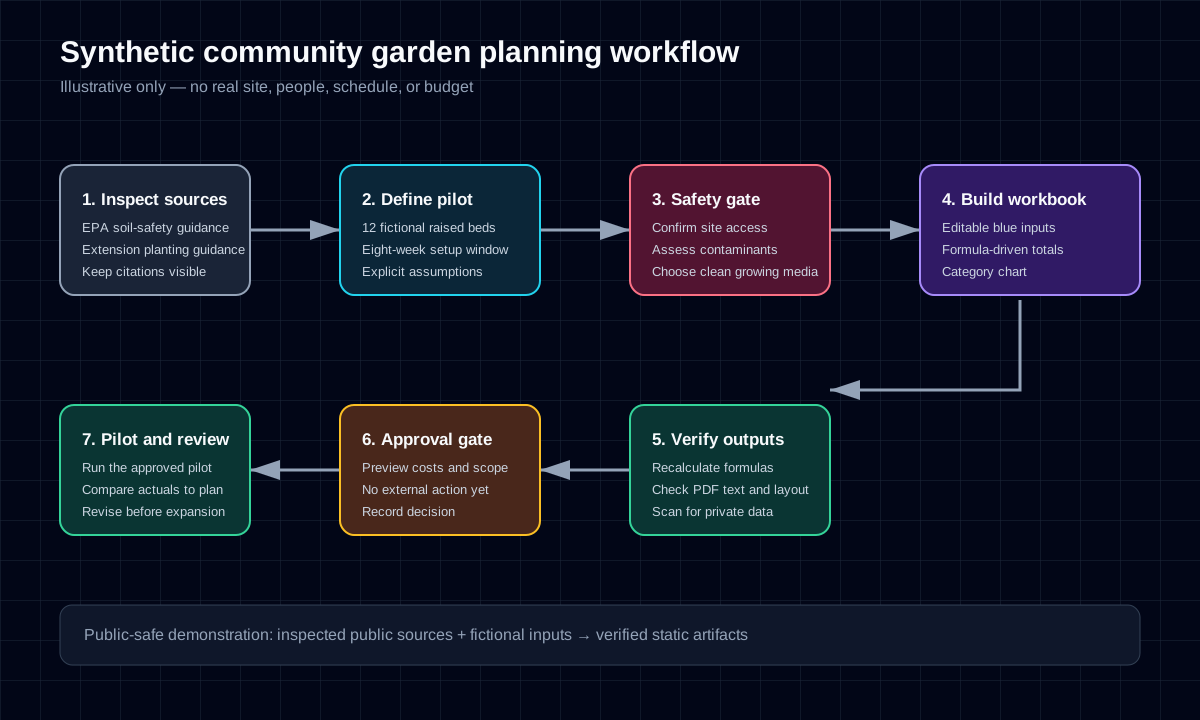
Synthetic community garden planning example. The fictional site, organization, people, schedule, and budget demonstrate how public guidance can become several coordinated, verified deliverables. No uploads, live agent, or private data are involved.
Document → cited action items
An entirely synthetic example: extract what a document says, preserve uncertainty, then propose actions for review. The fictional text below is the complete source for this example—not an extract from the downloadable planning brief.
Source document: Fictional seed-library note, version 1
Section 1 · Required inventory
“The volunteer coordinator must count the seed packets by 15 October 2030.”
Section 2 · Optional labels
“The team may print new shelf labels after the inventory is reviewed.”
Section 3 · Approval gate
“Before opening the seed library, obtain approval of the inventory. The reviewer and review date are not yet assigned.”
Extracted facts
Section 1 is an obligation (must), with an explicit owner role and deadline. Section 2 is permission (may), not a requirement. Section 3 requires approval but leaves the reviewer and date unresolved. This is authored sample text; no OCR uncertainty is involved.
Proposed actions · drafts for review
1. Count seed packets
Owner: volunteer coordinator. Due: 15 October 2030. Dependency: none stated. Acceptance: a recorded packet count (proposed verification, not an extra source obligation). Risk: the named role is not an assigned person. Citation: Fictional seed-library note v1, §1.
2. Resolve and obtain inventory approval
Owner / reviewer / due date: Unresolved. Dependency: inventory available for review; approval before opening. Acceptance: approval recorded (proposed verification). Risk: no opening date is supplied; do not invent a deadline. Citation: Fictional seed-library note v1, §3.
3. Consider printing shelf labels · optional
Owner: team; individual unresolved. Due: not stated. Dependency: inventory reviewed. Acceptance: decide whether to use this option; only print if approved. This is a proposed decision, not a mandatory task. Citation: Fictional seed-library note v1, §2.
No tasks have been created. Review the evidence, unresolved assignments, and proposed verification before any external action. This static example has no upload, agent connection, task-creation control, or write bridge.
Privacy and approval model
Public pages should contain intentionally public information or synthetic examples—not private records, credentials, personal workflows, or internal administration details.
PrivatePrivate information belongs behind an appropriate private boundary. Read-only access limits changes, but it does not by itself make information safe to publish.
DraftA draft is reviewable work with no external effect. Drafting a message, event, or change is different from sending or committing it.
ApprovedAn external action should follow a clear preview and explicit approval. The confirmation should state what will change, who or what is affected, and how the result will be verified.
Good request pattern
1. State the outcome
Say what useful result you need and who it is for.
2. Name the source and boundaries
Identify what material may be used, what must remain private, and whether the work is read-only.
3. Require verification
Ask Hermes to test links, open generated files, run checks, or read back changes.
4. Separate drafts from actions
Use explicit language such as “draft only,” “preview first,” or “wait for approval before sending.”
Public boundaries
This page intentionally provides explanations only. It does not expose a live Hermes agent, uploads, sessions, private integrations, route topology, administrative controls, internal endpoints, or approval/write mechanisms.
Current product documentation maintained by the Hermes Agent project.